Company
Zilliant
Role
Product Designer
Timeline
6 Months
Data Ingestion for Pricing Teams
Zilliant's core features are built on customer data, but legacy onboarding was manual and services-heavy, pushing time-to-value past 180 days. I led the design of a self-service data ingestion experience for the new platform, replacing a raw file browser with a guided import flow. It shipped to GA with data available in under 5 minutes and a measurable drop in ingestion errors.
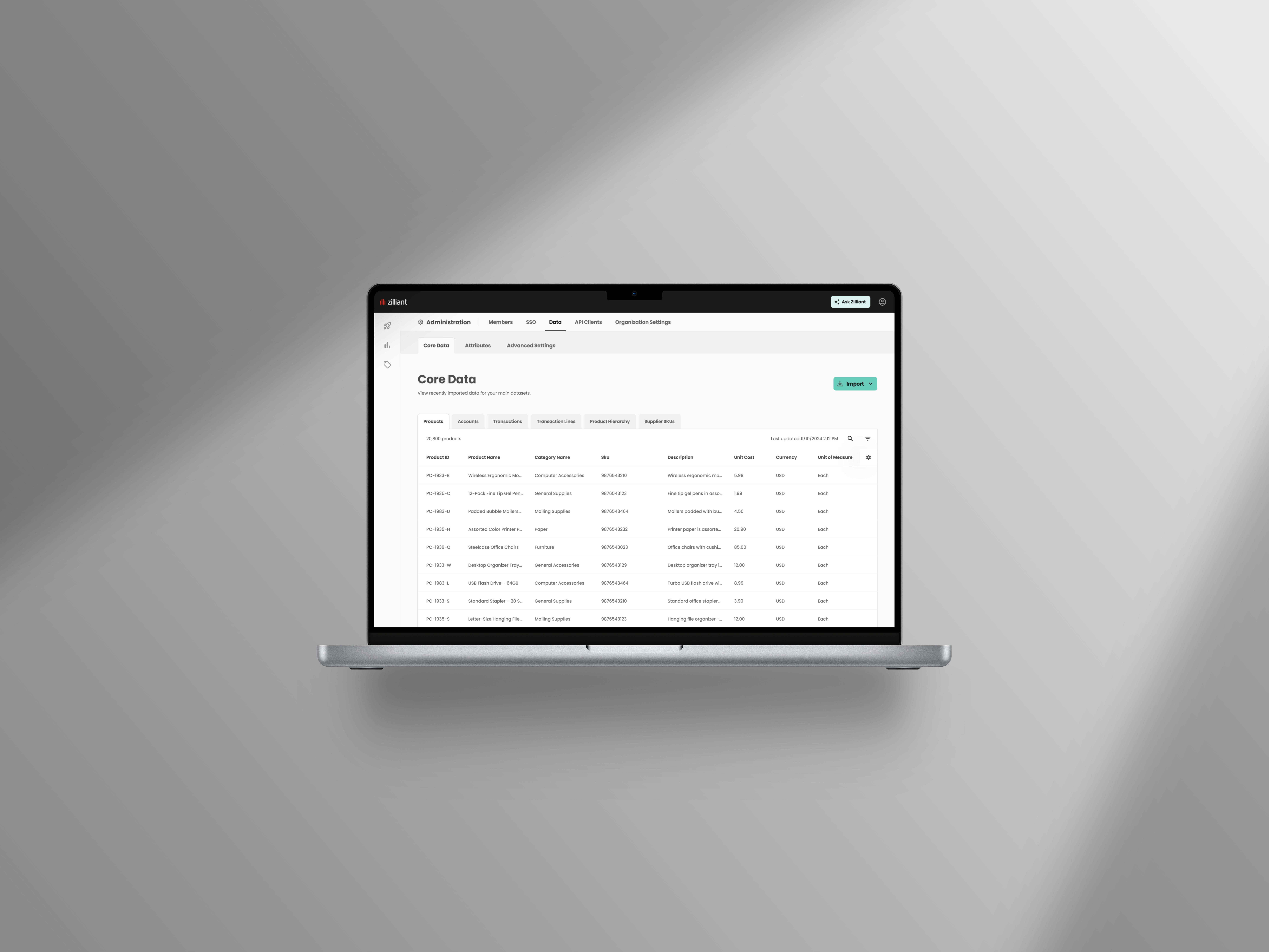
The Customer's First Step on a New Platform
Zilliant builds enterprise pricing software for manufacturers and distributors and was rebuilding its platform to unify Pricing, Analytics, and CPQ. Data was the foundation of that rebuild, as downstream features won't work without it. I was the lead designer for this project, working with product and engineering from concept through GA.
The Problem: No Self-Service Way to Get Data In
Customers couldn't get data into Zilliant on their own. The typical path was sending spreadsheets to the services team to program in, and the technical alternatives were SFTP or an embedded S3 Storage Browser buried in Admin/Settings. There was no column mapping, so files had to match the schema exactly, and when a file failed, the only feedback was an error email. Ingestion was the biggest blocker to customers seeing value.

The original upload experience: select a bucket, navigate folders, find the upload button hidden in a menu
What the research showed
I ran a survey of 50 participants across manufacturing and distribution to understand who imports data, how often, and what gets in their way, along with talking to our implementation team and pricing subject matter experts to understand what made data setup genuinely complex for these customers.
Ownership shifted over time, with Admins and IT running initial setup, while ongoing imports moved to analysts, finance, and sales ops. Those same users updated transaction and product data as often as daily or weekly, so the import experience needed to sit somewhere they could reach easily. Instead, it was buried in admin, and many were blocked by access issues.

Key findings from the data ownership survey
How We Got There
Mapped the customer data journey first
Working from the data model and conversations with customer success, I mapped who uploads what and when, from an initial load of products, accounts, and transactions to ongoing updates like weekly cost changes. Setup and maintenance turned out to be different jobs done by different people, which shaped everything from navigation to permissions.

Customer journey across initial onboarding, ongoing updates, and future automation
Presented three flow options scoped to engineering capacity
Rather than one ideal design, I presented three options, including a basic route stripping the S3 browser to essentials, an enhanced uploader using our design system, and an optimal three-step flow with column mapping. Each came with a list of asks that engineering could estimate.


Three import routes: cleaned-up S3 browser; design system uploader; the optimal flow with column mapping
Shaped how a third-party import tool fit the product
Ingestion wasn't core to Zilliant's value proposition, so the team leaned toward buying. I evaluated tools including OneSchema and Dromo, and identified constraints that would shape the design, like per-template imports and compatibility with a single import button. Then I configured OneSchema's white-labeling to match our branding, exported the config JSON for engineering, and worked with content design on the copy, so the third-party modal read as part of our product.

The embedded import tool, configured to match our design system
Made the case for mapping and validation to catch errors before submission
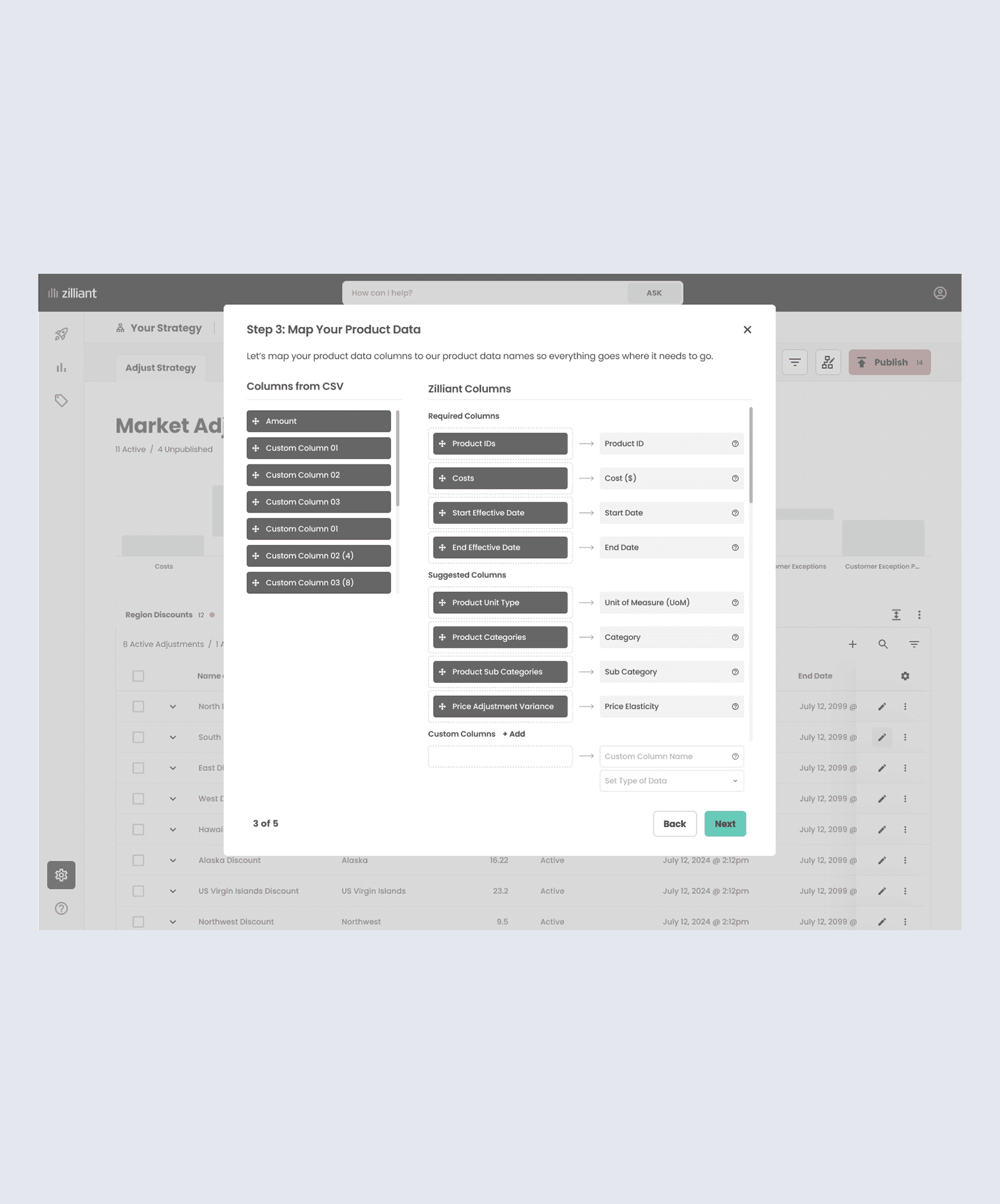
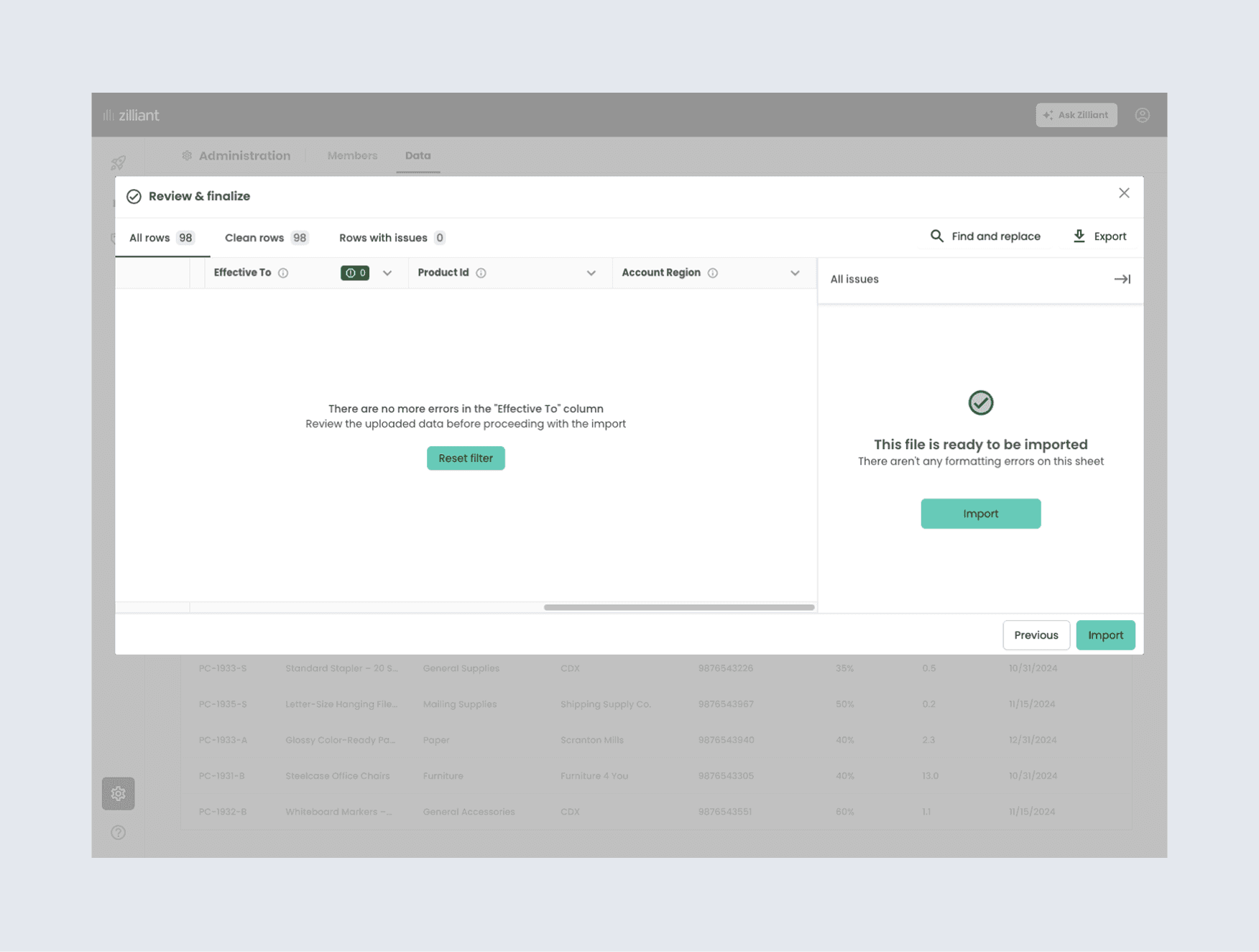
Customer schemas rarely match our field names, and forcing an exact match was a top source of failed loads and support tickets. The flow lets users map their columns to our fields and validates the file before submission. Our goal was to catch over 90% of file errors before ingestion starts, replacing the cycle of upload, wait, read an error email, retry.

The embedded import tool, configured to match our design system
Designed around a vendor constraint mid-project
OneSchema didn't support switching between file types inside the uploader once an import had started. I moved that decision earlier in the flow with a dropdown where users select their data type before entering the import flow, shaping the entry point rather than the tool itself.

Mapping customer columns to Zilliant fields; importing multiple levels through one entry point
Merged import history and upload status into one tab
After an upload, the only feedback was an email, and users had to navigate between tabs to check each dataset. I proposed one running history instead, since the person checking often isn't the one who ran the upload. It doubles as a live upload status.
Guided new users toward importing data without gating the product
A new customer could reach the pricing framework before importing any data, and everything breaks from there. One proposal was to gate the experience until data was loaded. I pushed back, since a new user's first instinct is to explore, and a locked product reads as an empty one. We shipped empty states in Analytics, a banner at the framework step, and copy that signaled urgency without blocking the path.


The Analytics empty state and the banner shown at the framework step
How We Got There
We worked async in Freehand, reviewing wireframes and open questions directly with Best Buy and Citi stakeholders rather than through separate decks. The work broke into three areas: how customers would issue certificates, how they'd manage their issuing preferences, and how they'd be notified when something changed.
Compared the current experience against what needed to change
Comparing the current functionality against the new module, one open question was whether to support printing certificates. We asked Best Buy directly for data on how often users interact with the printing feature – the answer was that it happens rarely, so we deprioritized it to keep scope focused.
Mapped the range of user states needed
The certificate tiers start at a minimum of 250 points to issue a reward, so the module needed to handle the common occurrence where users didn't have enough to issue anything yet. I designed empty states to suppress the issuance controls, links to display issued certificates, and added updated copy that adapts to the user's actual balance.
Reconsidered the need for confirmation modals
Early explorations included a full confirmation modal with Cancel/Confirm actions. Confirmation modals are best reserved for actions that are high-stakes or hard to undo. Issuing a certificate is technically not reversible, but it's low-stakes and easy to recover from. Recognizing that, I moved away from the modal in favor of a notification banner, which still gave users clear feedback without an unnecessary extra step.
Iterated on the preference-selection layout, with accessibility in mind
An early version of the "Change Preference" modal used a dropdown with the current selection awkwardly embedded inside it, which raised a labeling problem for screen readers. I pivoted to a radio button pattern with all selection options displayed, matching a pattern already used in other areas of the product, giving the control the label it needed.


Additional project visuals
What We Built
A guided import flow – pick a data type, upload, map columns, and validate, inside a branded OneSchema experience launched from a prominent CTA.
A centralized Data area – core tables for products, accounts, transactions, and transaction line items, viewable in the platform rather than invisible after upload.
Unified import history – one audit log with status, user, timestamp, and file size across all data types, plus in-app alerts.
Pre-ingestion validation – errors caught and fixed before submission, replacing errors by email.
Onboarding guidance – empty states and banners guiding new customers to load data without gating exploration.


What Changed
Customers now load their own data instead of routing spreadsheets through the services team. Data is available in under 5 minutes, and error rates dropped as validation moved earlier in the flow. Time-to-value went from over 180 days to under 60. The survey findings also changed the organization's thinking by pushing data access from Admin-only toward role-based permissions.
What's Next
Custom attributes shipped as an extension of this work, letting customers add their own fields through the same import flow. My ERP integration research is shaping the shift from customers pushing files to Zilliant pulling data directly from systems like SAP.
Company
Zilliant
Role
Product Designer
Duration
6 Months
Data Ingestion for Pricing Teams
Zilliant's core features are built on customer data, but legacy onboarding was manual and services-heavy, pushing time-to-value past 180 days. I led the design of a self-service data ingestion experience for the new platform, replacing a raw file browser with a guided import flow. It shipped to GA with data available in under 5 minutes and a measurable drop in ingestion errors.
The Customer's First Step on a New Platform
Zilliant builds enterprise pricing software for manufacturers and distributors and was rebuilding its platform to unify Pricing, Analytics, and CPQ. Data was the foundation of that rebuild, as downstream features won't work without it. I was the lead designer for this project, working with product and engineering from concept through GA.
The Problem: No Self-Service Way to Get Data In
Customers couldn't get data into Zilliant on their own. The typical path was sending spreadsheets to the services team to program in, and the technical alternatives were SFTP or an embedded S3 Storage Browser buried in Admin/Settings. There was no column mapping, so files had to match the schema exactly, and when a file failed, the only feedback was an error email. Ingestion was the biggest blocker to customers seeing value.
The original upload experience: select a bucket, navigate folders, find the upload button hidden in a menu
What the research showed
I ran a survey of 50 participants across manufacturing and distribution to understand who imports data, how often, and what gets in their way, along with talking to our implementation team and pricing subject matter experts to understand what made data setup genuinely complex for these customers.
Ownership shifted over time, with Admins and IT running initial setup, while ongoing imports moved to analysts, finance, and sales ops. Those same users updated transaction and product data as often as daily or weekly, so the import experience needed to sit somewhere they could reach easily. Instead, it was buried in admin, and many were blocked by access issues.
Key findings from the data ownership survey
How We Got There
Mapped the customer data journey first
Working from the data model and conversations with customer success, I mapped who uploads what and when, from an initial load of products, accounts, and transactions to ongoing updates like weekly cost changes. Setup and maintenance turned out to be different jobs done by different people, which shaped everything from navigation to permissions.
Customer journey across initial onboarding, ongoing updates, and future automation
Presented three flow options scoped to engineering capacity
Rather than one ideal design, I presented three options, including a basic route stripping the S3 browser to essentials, an enhanced uploader using our design system, and an optimal three-step flow with column mapping. Each came with a list of asks that engineering could estimate.

Three import routes: cleaned-up S3 browser; design system uploader; the optimal flow with column mapping
Shaped how a third-party import tool fit the product
Ingestion wasn't core to Zilliant's value proposition, so the team leaned toward buying. I evaluated tools including OneSchema and Dromo, and identified constraints that would shape the design, like per-template imports and compatibility with a single import button. Then I configured OneSchema's white-labeling to match our branding, exported the config JSON for engineering, and worked with content design on the copy, so the third-party modal read as part of our product.
The embedded import tool, configured to match our design system
Made the case for mapping and validation to catch errors before submission
Customer schemas rarely match our field names, and forcing an exact match was a top source of failed loads and support tickets. The flow lets users map their columns to our fields and validates the file before submission. Our goal was to catch over 90% of file errors before ingestion starts, replacing the cycle of upload, wait, read an error email, retry.
Designed around a vendor constraint mid-project
OneSchema didn't support switching between file types inside the uploader once an import had started. I moved that decision earlier in the flow with a dropdown where users select their data type before entering the import flow, shaping the entry point rather than the tool itself.
Mapping customer columns to Zilliant fields; importing multiple levels through one entry point
Merged import history and upload status into one tab
After an upload, the only feedback was an email, and users had to navigate between tabs to check each dataset. I proposed one running history instead, since the person checking often isn't the one who ran the upload. It doubles as a live upload status.
Guided new users toward importing data without gating the product
A new customer could reach the pricing framework before importing any data, and everything breaks from there. One proposal was to gate the experience until data was loaded. I pushed back, since a new user's first instinct is to explore, and a locked product reads as an empty one. We shipped empty states in Analytics, a banner at the framework step, and copy that signaled urgency without blocking the path.
The Analytics empty state and the banner shown at the framework step
What We Built
A guided import flow – pick a data type, upload, map columns, and validate, inside a branded OneSchema experience launched from a prominent CTA.
A centralized Data area – core tables for products, accounts, transactions, and transaction line items, viewable in the platform rather than invisible after upload.
Unified import history – one audit log with status, user, timestamp, and file size across all data types, plus in-app alerts.
Pre-ingestion validation – errors caught and fixed before submission, replacing errors by email.
Onboarding guidance – empty states and banners guiding new customers to load data without gating exploration.
What Changed
Customers now load their own data instead of routing spreadsheets through the services team. Data is available in under 5 minutes, and error rates dropped as validation moved earlier in the flow. Time-to-value went from over 180 days to under 60. The survey findings also changed the organization's thinking by pushing data access from Admin-only toward role-based permissions.
What's Next
Custom attributes shipped as an extension of this work, letting customers add their own fields through the same import flow. My ERP integration research is shaping the shift from customers pushing files to Zilliant pulling data directly from systems like SAP.
Company
Zilliant
Role
Product Designer
Timeline
6 Months
Data Ingestion for Pricing Teams
Zilliant's core features are built on customer data, but legacy onboarding was manual and services-heavy, pushing time-to-value past 180 days. I led the design of a self-service data ingestion experience for the new platform, replacing a raw file browser with a guided import flow. It shipped to GA with data available in under 5 minutes and a measurable drop in ingestion errors.
The Customer's First Step on a New Platform
Zilliant builds enterprise pricing software for manufacturers and distributors and was rebuilding its platform to unify Pricing, Analytics, and CPQ. Data was the foundation of that rebuild, as downstream features won't work without it. I was the lead designer for this project, working with product and engineering from concept through GA.
The Problem: No Self-Service Way to Get Data In
Customers couldn't get data into Zilliant on their own. The typical path was sending spreadsheets to the services team to program in, and the technical alternatives were SFTP or an embedded S3 Storage Browser buried in Admin/Settings. There was no column mapping, so files had to match the schema exactly, and when a file failed, the only feedback was an error email. Ingestion was the biggest blocker to customers seeing value.
The original upload experience: select a bucket, navigate folders, find the upload button hidden in a menu
Additional project visuals
What the research showed
I ran a survey of 50 participants across manufacturing and distribution to understand who imports data, how often, and what gets in their way, along with talking to our implementation team and pricing subject matter experts to understand what made data setup genuinely complex for these customers.
Ownership shifted over time, with Admins and IT running initial setup, while ongoing imports moved to analysts, finance, and sales ops. Those same users updated transaction and product data as often as daily or weekly, so the import experience needed to sit somewhere they could reach easily. Instead, it was buried in admin, and many were blocked by access issues.
Key findings from the data ownership survey
How We Got There
Mapped the customer data journey first
Working from the data model and conversations with customer success, I mapped who uploads what and when, from an initial load of products, accounts, and transactions to ongoing updates like weekly cost changes. Setup and maintenance turned out to be different jobs done by different people, which shaped everything from navigation to permissions.
Customer journey across initial onboarding, ongoing updates, and future automation
Presented three flow options scoped to engineering capacity
Rather than one ideal design, I presented three options, including a basic route stripping the S3 browser to essentials, an enhanced uploader using our design system, and an optimal three-step flow with column mapping. Each came with a list of asks that engineering could estimate.
Three import routes: cleaned-up S3 browser; design system uploader; the optimal flow with column mapping
Shaped how a third-party import tool fit the product
Ingestion wasn't core to Zilliant's value proposition, so the team leaned toward buying. I evaluated tools including OneSchema and Dromo, and identified constraints that would shape the design, like per-template imports and compatibility with a single import button. Then I configured OneSchema's white-labeling to match our branding, exported the config JSON for engineering, and worked with content design on the copy, so the third-party modal read as part of our product.
The embedded import tool, configured to match our design system
Made the case for mapping and validation to catch errors before submission
Customer schemas rarely match our field names, and forcing an exact match was a top source of failed loads and support tickets. The flow lets users map their columns to our fields and validates the file before submission. Our goal was to catch over 90% of file errors before ingestion starts, replacing the cycle of upload, wait, read an error email, retry.
The embedded import tool, configured to match our design system
Designed around a vendor constraint mid-project
OneSchema didn't support switching between file types inside the uploader once an import had started. I moved that decision earlier in the flow with a dropdown where users select their data type before entering the import flow, shaping the entry point rather than the tool itself.
Mapping customer columns to Zilliant fields; importing multiple levels through one entry point
Merged import history and upload status into one tab
After an upload, the only feedback was an email, and users had to navigate between tabs to check each dataset. I proposed one running history instead, since the person checking often isn't the one who ran the upload. It doubles as a live upload status.
Guided new users toward importing data without gating the product
A new customer could reach the pricing framework before importing any data, and everything breaks from there. One proposal was to gate the experience until data was loaded. I pushed back, since a new user's first instinct is to explore, and a locked product reads as an empty one. We shipped empty states in Analytics, a banner at the framework step, and copy that signaled urgency without blocking the path.
The Analytics empty state and the banner shown at the framework step
How We Got There
We worked async in Freehand, reviewing wireframes and open questions directly with Best Buy and Citi stakeholders rather than through separate decks. The work broke into three areas: how customers would issue certificates, how they'd manage their issuing preferences, and how they'd be notified when something changed.
Compared the current experience against what needed to change
Comparing the current functionality against the new module, one open question was whether to support printing certificates. We asked Best Buy directly for data on how often users interact with the printing feature – the answer was that it happens rarely, so we deprioritized it to keep scope focused.
Mapped the range of user states needed
The certificate tiers start at a minimum of 250 points to issue a reward, so the module needed to handle the common occurrence where users didn't have enough to issue anything yet. I designed empty states to suppress the issuance controls, links to display issued certificates, and added updated copy that adapts to the user's actual balance.
Reconsidered the need for confirmation modals
Early explorations included a full confirmation modal with Cancel/Confirm actions. Confirmation modals are best reserved for actions that are high-stakes or hard to undo. Issuing a certificate is technically not reversible, but it's low-stakes and easy to recover from. Recognizing that, I moved away from the modal in favor of a notification banner, which still gave users clear feedback without an unnecessary extra step.
Iterated on the preference-selection layout, with accessibility in mind
An early version of the "Change Preference" modal used a dropdown with the current selection awkwardly embedded inside it, which raised a labeling problem for screen readers. I pivoted to a radio button pattern with all selection options displayed, matching a pattern already used in other areas of the product, giving the control the label it needed.
Additional project visuals
What We Built
A guided import flow – pick a data type, upload, map columns, and validate, inside a branded OneSchema experience launched from a prominent CTA.
A centralized Data area – core tables for products, accounts, transactions, and transaction line items, viewable in the platform rather than invisible after upload.
Unified import history – one audit log with status, user, timestamp, and file size across all data types, plus in-app alerts.
Pre-ingestion validation – errors caught and fixed before submission, replacing errors by email.
Onboarding guidance – empty states and banners guiding new customers to load data without gating exploration.